Every large language model has a knowledge cutoff — the date its training data ends. Ask it about anything that happened after that date and it simply doesn't know: not vaguely, not partially — the information isn't in the model at all. For a tool that summarizes YouTube videos, this matters more than it first sounds, because so much of what people watch is new: product launches, breaking news, model releases from three days ago. The transcript talks about a world the summarizer has never seen.
And there's a second, sneakier problem: the transcript itself is often wrong. Creators speak from memory. A price recalled as “around two dollars” actually launched at $0.75. A magnitude, a date, a version number — off by just enough to matter. A summary that faithfully repeats the mistake is doing its job and still misleading you.
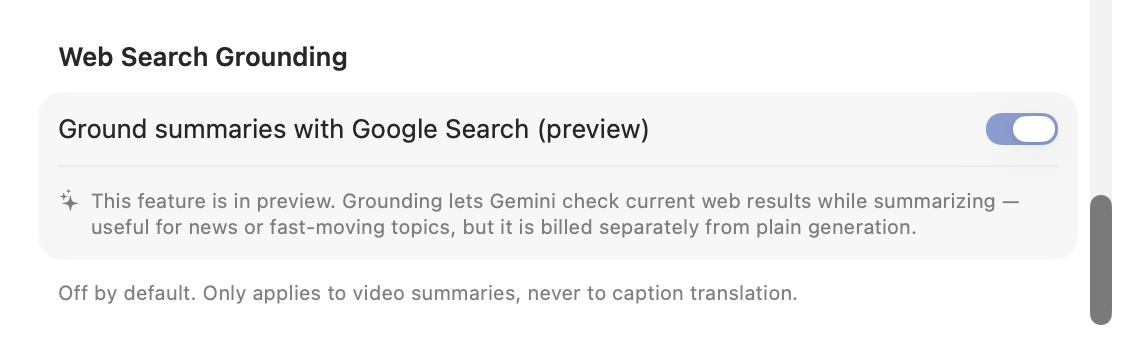
This is where grounding with Google Search comes in. We believe that even an AI video summary should give you the option of automatic fact-checking. With Web Search Grounding — a new opt-in preview in DeepSRT's Settings — Gemini can check factual claims against live search results while it summarizes, reach past its own cutoff, correct what's wrong, and say so.
Experiment 1: a wrong price claim
We fed the feature a transcript claiming a new AI model “costs around two dollars per million tokens, more expensive than its predecessor.” The actual launch price was $0.75 per million input tokens — cheaper, not pricier.
| Claim in transcript | Without grounding | With grounding |
|---|---|---|
| “Around $2 per million tokens, more expensive than the previous model” | Repeated as fact | ✅ Searched, cited the official pricing page: “Contrary to misconceptions regarding higher pricing… launched with a 50% discount, at $0.75 per million input tokens” |
Experiment 2: a fabricated earthquake report
Next, a harder case: a made-up news transcript about a real earthquake in Spain, with the city, magnitude, weekday, and casualties all deliberately wrong. The quake happened days ago — well past any model's training data, so only a live search could get this right.
| Detail | Transcript said (wrong) | Without grounding | With grounding |
|---|---|---|---|
| Location | Barcelona | Repeated “Barcelona” | ✅ Corrected to “the Granada province in Andalusia” (near Alhendín) |
| Magnitude | 6.5 | Repeated “magnitude 6.5” | ✅ Corrected to “a magnitude of 5.0 — not 6.5” |
| Time | Wednesday afternoon | Repeated it | ✅ Corrected to “the early hours of a Saturday morning” |
| Casualties | Injuries, collapsed buildings | Repeated “buildings collapse… multiple people injured” | ✅ Corrected to “no buildings collapsed and no injuries were reported” |
Experiment 3: a model version that doesn't exist
The hardest kind of error isn't a wrong number for a real thing — it's a thing that doesn't exist. We wrote a transcript announcing “Grok 3.6,” a version that was never released (the real launch, days earlier, was Grok 4.6), with a wrong benchmark score and a wrong price on top.
| Detail | Transcript said (wrong) | Without grounding | With grounding |
|---|---|---|---|
| Version | Grok 3.6 (never existed) | Repeated “Grok 3.6”, never noticed | ✅ Recognized the real release: “Grok 4.6 (correcting the reference to Grok 3.6…)” |
| Benchmark score | 75 on the Intelligence Index | Repeated “approximately 75” | ✅ Corrected to “a score of 61 rather than 75” |
| Price | $5 per million input tokens | Repeated “roughly five dollars” | ✅ Corrected to “$2.00 per million input tokens and $6.00 per million output tokens” |
| Company name | xAI (renamed since) | Repeated “xAI” | ⚠️ Kept “xAI” — the rename slipped through, a real limitation |
The part worth writing down
Enabling Google Search as a tool does not make the model search. It decides per request whether a claim looks worth checking, and in our first test it simply didn't — same transcript, tool enabled, zero searches, wrong number repeated verbatim. The output was indistinguishable from having the feature off.
What made it real was one added instruction in the summary prompt: verify specific factual claims — prices, dates, versions, statistics — against current information, and if the source is wrong, correct it and briefly say so. With that line, the same transcript triggered a search on every run, three out of three, each time citing sources and naming the correction.
The honest limits
This is a preview, and we're keeping the scope narrow deliberately:
Best effort, not a guarantee. Whether to search, what to search for, and which sources to trust are all decided by the Gemini model per request. It corrects what it catches — our experiments show it catching a lot — but grounding cannot promise 100% accuracy. Treat it as a diligent fact-checker, not an oracle.
It costs more. Grounded requests consume additional tokens (the search results enter the context) and search itself is billed on top of plain generation. If you turn this on, set a monthly spending cap on your Google account first — the same advice we give for AI transcription applies doubly here.
Off by default. Grounded requests are billed differently from plain generation, and letting a summarizer reach out to the web is a behavior change you should choose, not receive silently in an update.
Summaries only. Caption translation never grounds — there is nothing to search for when translating a sentence, and grounding is incompatible with the structured-output mode our caption pipeline depends on.
It corrects claims, not context. Specific numbers get checked. Background facts — a company that quietly renamed itself, as experiment 3 showed — may slip through. The model verifies what looks like a claim; it doesn't re-derive the whole world.
Gemini only. Grounding is a Gemini capability. If your summaries run on another provider, the toggle stays off.